
Make full use of the ESTUN E300 system guide
2026-04-20

When it comes to understanding the ESTUN E300, many users are eager to learn how to make the most of this powerful tool. If you're looking for detailed insights and practical advice on leveraging the system effectively, you've come to the right place. In this article, I'll explore how the ESTUN E300 can be a game-changer in optimizing your workflow and boosting productivity. Whether you're new to ESTUN products or aiming to get the most out of your existing setup, this guide will provide the key strategies and information you need to fully utilize the ESTUN E300 to its maximum potential.
Introduction
The ESTUN E300 Overview highlights how this advanced numerical control (NC) device serves as a dedicated solution for the torsion bending machine. Leveraging ESTUN’s years of expertise, the E300 delivers a comprehensive and cost-effective solution, backed by its proprietary drive control technology.
To fully leverage the ESTUN E300, it is essential to understand its key features and specifications. The device features an integrated product structure powered by a high-performance A8 processor. It is equipped with a vibrant 5.6-inch, 640 × 480 dot matrix, 18-bit full-color display screen, which enhances visual interaction and usability. Furthermore, the E300 includes integrated I/O ports, serial ports, and a USB port, offering versatile connectivity options.
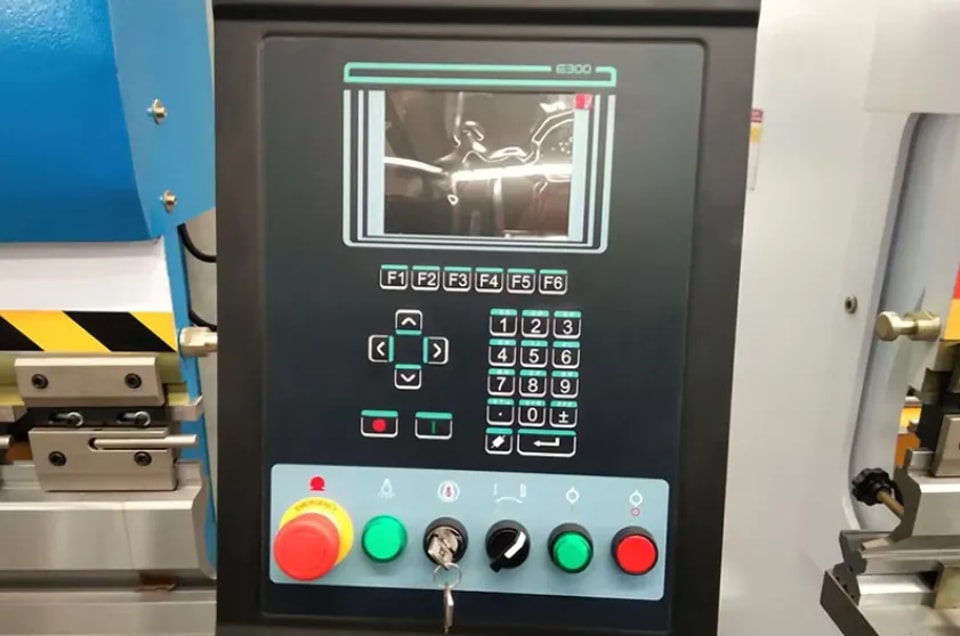
Operating the E300 is intuitive, thanks to the accessible buttons located on its front panel. Moreover, the customized suspension cabinet houses the pump switch and the emergency stop button, catering to specific user needs. This thoughtful design element ensures enhanced safety and operational efficiency.
By embracing the insights from the ESTUN E300 Overview, users can optimize the device’s capabilities for superior performance and reliability in their applications.
Features
Key Features of the ESTUN E300:
1. Multi-Axis Support: The E300 device can manage up to four axes: X-axis, Y-axis, R-axis, and C-axis, providing versatile control for complex bending operations.
2. Automatic Calculations: The system efficiently calculates block positions based on the bending angle, material, thickness, and mold parameters, streamlining setup processes.
3. High-Accuracy Control: With servo systems managing the X-axis and R-axis, you can achieve precise control over the back gauge, enhancing the accuracy of bends.
4. Flexible C-Axis Control: Choose between hydraulic or mechanical options for controlling the C-axis, depending on your operational needs.
5. Comprehensive Programming: Program both in absolute value or angle, allowing for flexibility in machine setup.
6. Parameter Management: Easily backup, restore, import, and export parameters to simplify machine commissioning and ensure smooth operation.
7. Efficient Program Editing: Improve operational efficiency by editing programs on a single page, minimizing downtime and enhancing productivity.
8. Advanced Timing Control: Program dwell time and retracting delay directly through the E300, replacing traditional time relays for improved precision.
9. Safety and Efficiency: The device helps avoid interference or collision of the die and allows for adjustment of opening distances, ensuring safe and efficient operations.
10. Real-Time Monitoring: View real-time status updates of inputs, outputs, valves, and potential faults on the Monitor page, ensuring proactive maintenance.
11. Automatic Adjustments: Benefit from automated adjustments such as the zero position for the R-axis and clamping point positions, facilitating seamless operation transitions.
12. Versatile Materials Handling: Program material and die information directly into the system for tailored bending operations.
13. Operation Modes: Choose among Jog, Single, and Continuous modes for various job requirements, supporting a wide range of production needs.
14. Customizable Settings: Language and unit settings are adjustable to suit your preferred interface requirements.
15. IO Port Allocation: Freely allocate IO ports, with the device detecting duplicates to prevent errors.
16. Positioning Options: Utilize bilateral and unilateral positioning, including a slug clearance function, to optimize machine use.
17. Reference Points: Easily teach or search for reference points to streamline setup procedures.
18. Manual Control: Servo-controlled axes can be moved manually, providing hands-on control for adjustments.
19. Data Protection: Real-time memory storage safeguards parameters, positions, and programs against power interruptions, maintaining continuity and reliability.
By understanding and leveraging the features of the ESTUN E300, you can optimize your machine’s performance and enhance your production efficiency. Whether you’re dealing with complex bending tasks or simple operations, the ESTUN E300 overview provides you with the insights you need to upgrade your manufacturing processes.
Appearance
Control Panel
The following figure is the appearance of the suspended device, and it includes many elements
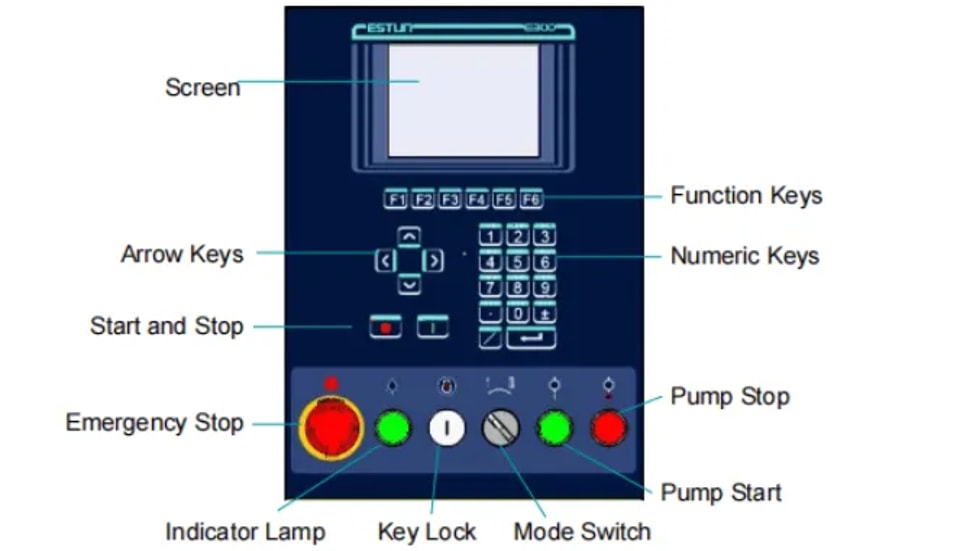
The descriptions of each element are listed below.
1. Screen: 5.6 inch, 640 × 480 dot matrix, 18-bit full color display screen.
2. Function Keys: Function keys, which corresponding to options on below of each page.
3. Numeric Keys: It consists of CLEAR, NUMBERS, POINT, ± and ENTER. They are often used in programming and settings.
4. Arrow Keys: Press these buttons can move the cursor.
5. Start and Stop: Press START key when your program has been completed, and each axis can perform the positioning. Press STOP key, the machine can stop running
6. Mode Switch: Turn this switch for switching the operation mode between Single and Jog. NOTE: For switching the operation mode to Continuous mode, turn the switch to Single mode, and set the parameter Automatic to Enable on the HMI.
7. Emergency Stop: In the case of emergency stop use the EMERGENCY STOP controller.
8. Key Lock: A key lock, which can turn ON or turn OFF the device.
9. Indicator Lamp: When the device is power on, the indicator lamp can be lighted.
10. Pump Start: Press this button can turn on the oil pump, indicating the machine is ready.
11. Pump Stop: Press this button can turn off the oil pump, indicating the machine is unable to run. In addition, this signal can be cut off when EMERGENCY STOP button was pressed down.
Ports
The ESTUN E300 Overview highlights the device’s connectivity features, including six types of ports for external device integration. These ports enhance the E300’s functionality. Table below in the overview provides detailed descriptions of each port.
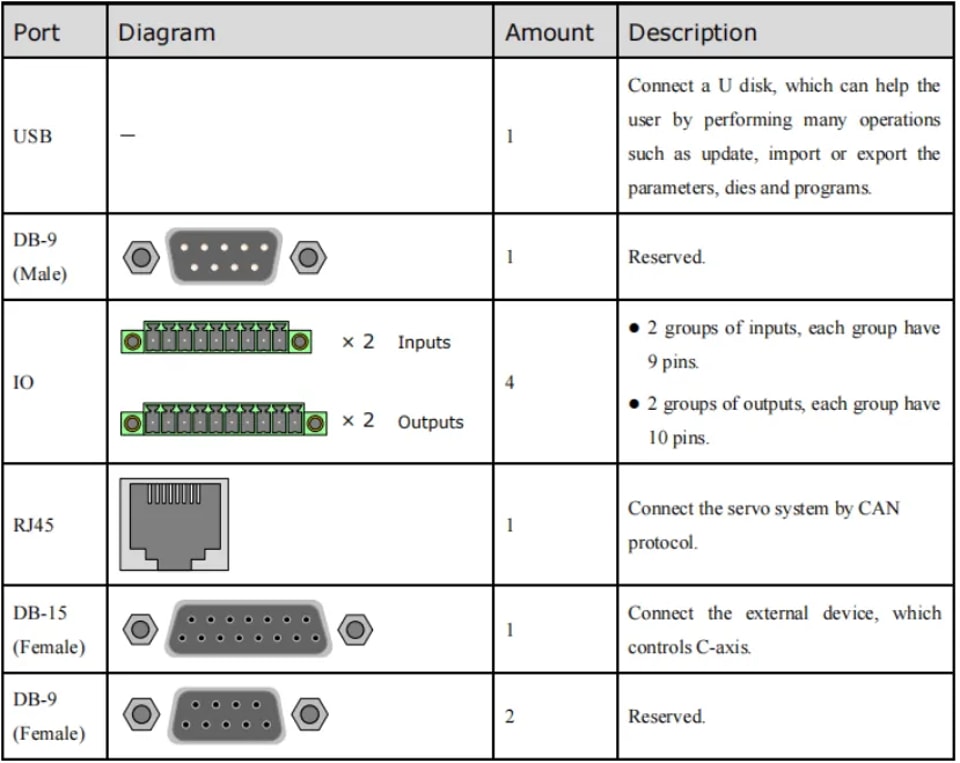
By understanding and utilizing these connections, users can fully leverage the ESTUN E300’s capabilities and ensure seamless operation with other devices.
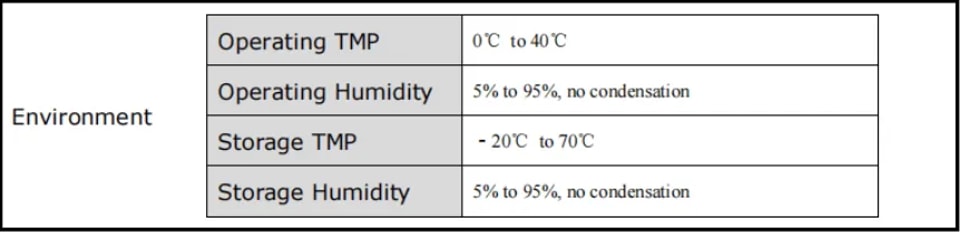
Electrical Specifications
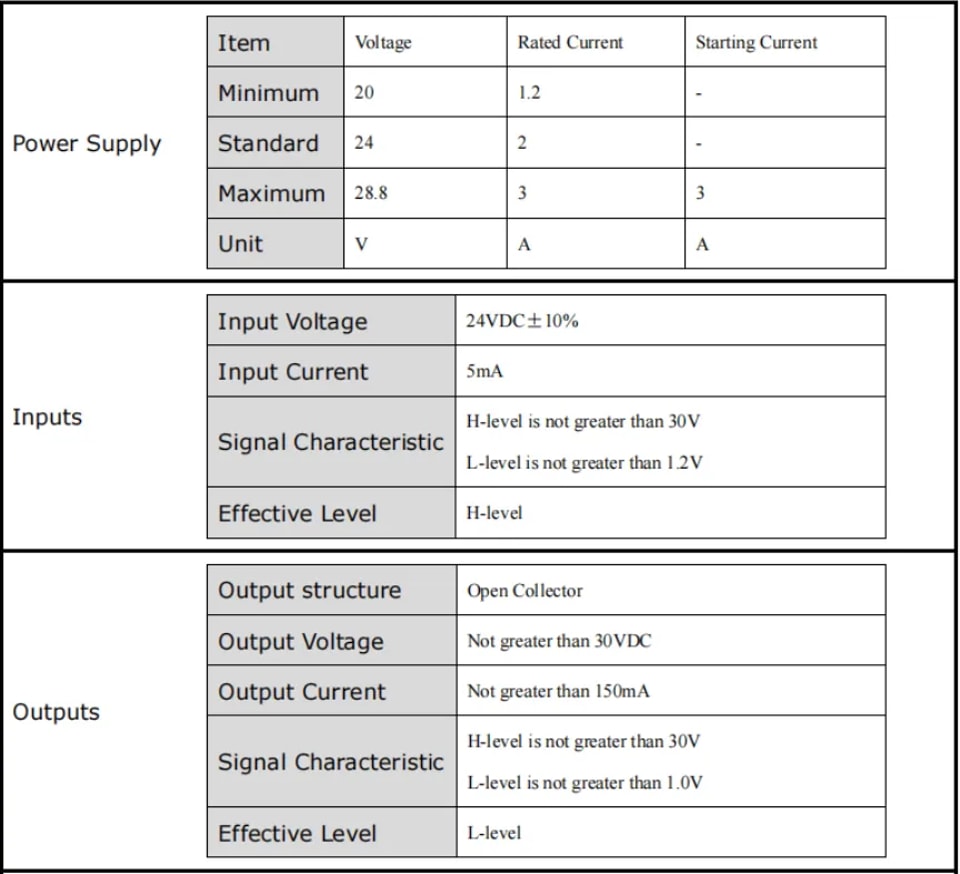
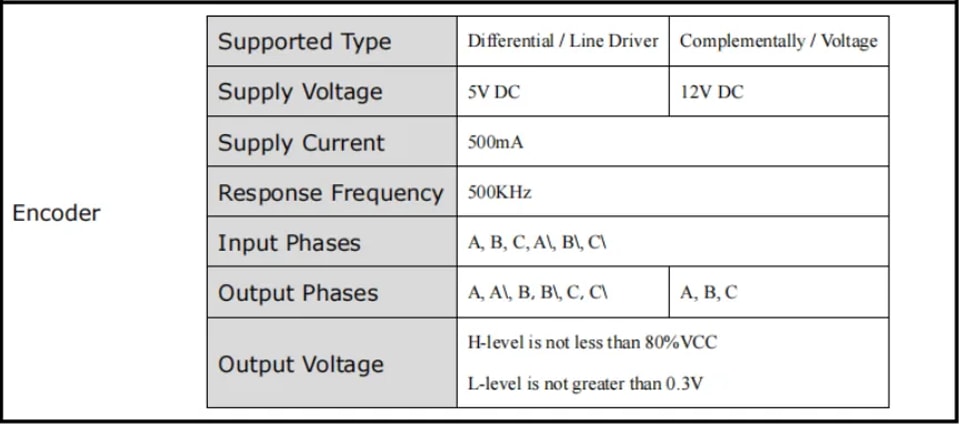
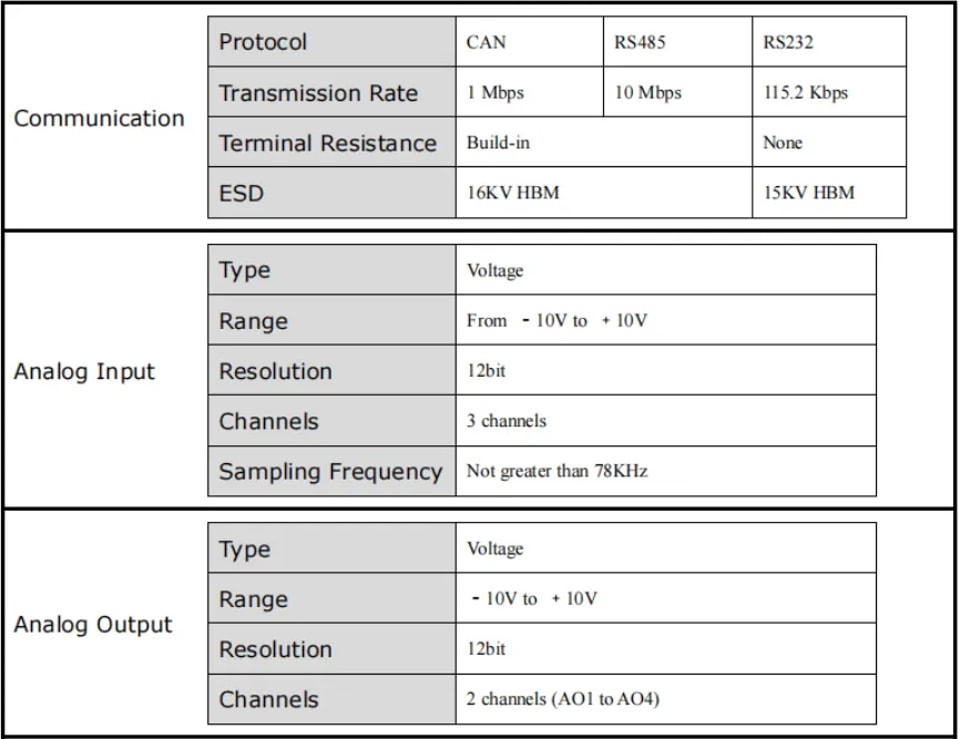
Conclusion
Effectively leveraging the ESTUN E300 begins with a thorough understanding of its key features and specifications, which can significantly boost your operational efficiency. By familiarizing yourself with the detailed capabilities and applications outlined in the overview, you can unlock the full potential of the ESTUN E300 in your projects.
To further optimize your use of the system, consider reaching out to our experts for personalized advice or exploring the additional resources and documents available on our website. Please don't hesitate to contact us for more detailed support or any inquiries.
Contact Us