
How to Troubleshoot Laser Cutting Sparks Problem Efficiently
2026-10-10

Spark-related faults are among the most common problems met in laser cutting work. Sparks are a normal part of the process, but when they turn unusual they usually point to something wrong that can hurt cut quality, slow output, and raise safety concerns. If you have noticed too many sparks, sparks flying in odd directions, strange colors, or uneven cutting results, you are in the right place. In this article, I set out the most frequent causes of laser cutting spark problems and give a step-by-step way to fix them so you can get back to top cutting performance and steady production.
Getting to Know the Laser Cutting Sparks Problem
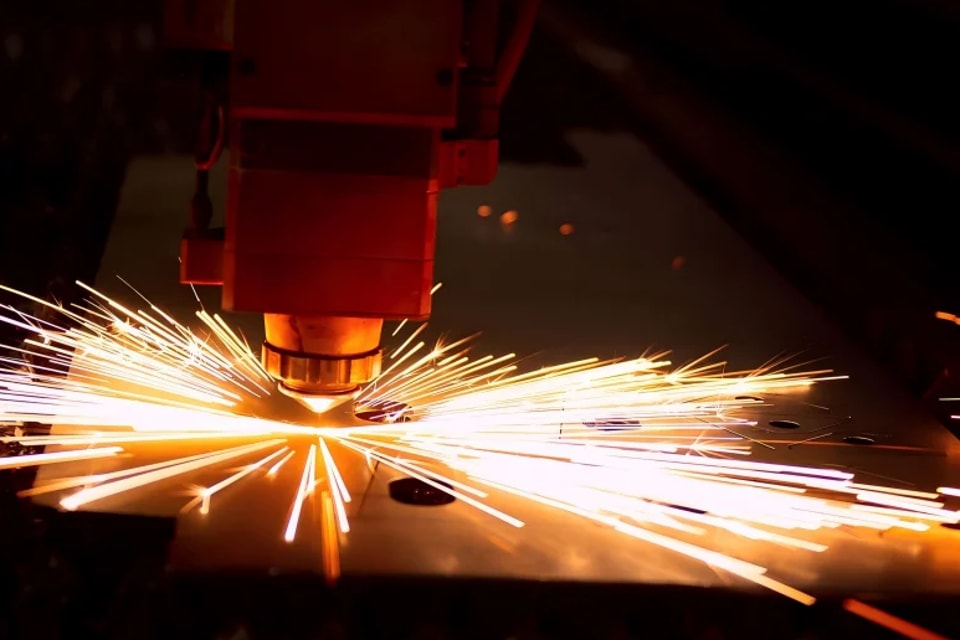
What Normal Laser Cutting Sparks Look Like
As the beam cuts, molten metal is thrown out of the kerf and this is what forms the sparks. Under good conditions, sparks should look even and fall straight down through the cut.
Signs of normal sparks are:
A steady spark direction
A stable spark intensity
Little spatter
Clean cut edges
When the way sparks behave changes a lot, it usually means a machine or process problem.
Signs That Sparks Are Not Right
A laser cutting spark fault can show up in several ways:
Sparks produced in large amounts
Sparks thrown out to the side
Sparks that come and go
Bright, popping sparks
A heavy build-up of slag
Cutting that does not go all the way through
Catching these signs early helps stop bigger production problems.
Why Spark Problems Happen: The Common Causes
Cutting Parameters That Are Off
Cutting settings that are not right are one of the most common reasons behind unusual sparks.
Parameter issues can include:
Beam power set too high
Cutting speed that is too fast
A focus position that is off
Wrong pulse frequency
An incorrect duty cycle
When the settings do not match the thickness and kind of material, the sparks become unstable.
A Dirty or Damaged Nozzle
The nozzle is what controls the assist gas flow around the cutting area.
A damaged nozzle can lead to:
Gas flow that is unsteady
Sparks going to the side
Edges of lower quality
More dross
Checking it regularly keeps the cutting steady.
Assist Gas Pressure That Is Too Low
Assist gas is what clears molten material out of the kerf.
When gas pressure is too low:
The spark volume grows
Slag begins to collect
Cut edges become coarse
Depth of cut quality falls
Always compare the gas pressure with what the maker recommends.
A Soiled Protective Lens
Dust, smoke residue, and dirt on the protective lens lower how well the laser beam gets through.
Common effects are:
Cutting power that falls
Stronger sparks
Overheating
Cut quality that is uneven
A clean lens is essential for steady laser output.
Dirt on the Material Surface
Rust, oil, paint, and other dirt on the surface can change how the cutting process behaves.
Dirty material can lead to:
Sparks that are uneven
A lot of smoke
Cutting that is unstable
A poor edge finish
Cleaning the sheet before cutting often gives better results.
Fixing Spark Problems Step by Step
Step 1: Watch the Spark Direction and Behavior
Before you change anything, watch the sparks closely while the machine is cutting.
Ask yourself:
Are the sparks moving downward?
Are they flying out sideways?
Are they unusually bright?
Do they come and go?
How the sparks behave gives useful hints about what is wrong.
Step 2: Confirm the Cutting Parameters
Look at the cutting program and compare its settings with the values that are recommended.
Check:
Laser power
Cutting speed
Focus height
Frequency settings
Assist gas pressure
Small tweaks can make cutting much more stable.
Step 3: Examine the Nozzle
Take the nozzle off and look at it for:
Damage
Deformation
Spatter buildup
Misalignment
Change a damaged nozzle right away to bring back proper gas flow.
Step 4: Wipe the Protective Lens
Check the protective lens under good light.
Look for:
Burn marks
Dust buildup
Oil residue
Scratches
Clean or replace the lens when needed, using the approved cleaning materials.
Step 5: Check the Assist Gas Supply
Verify:
Gas purity
Pressure levels
Flow stability
Hose condition
Leaks or pressure changes often add to laser cutting spark problems.
Step 6: Judge the Material Quality
Look over the metal sheet for:
Rust
Surface coatings
Oil contamination
Too much oxidation
Using clean material helps keep the cutting conditions steady.
Preventive Upkeep to Keep Spark Issues Away
Set Up Daily Inspection Routines
Before each shift, I suggest checking:
Nozzle condition
Lens cleanliness
Gas pressure
Cooling system status
Routine checks cut down the chance of unexpected cutting faults.
Look After the Optical Parts
Optical parts should be cleaned on a regular basis so that as much laser energy as possible reaches the workpiece.
Pay special attention to:
Protective lenses
Focusing lenses
Laser windows
Looking after the optics directly improves cutting quality.
Keep the Assist Gas System in Good Shape
Inspect these on a regular basis:
Regulators
Gas hoses
Connectors
Filters
Steady gas delivery keeps spark patterns and cutting performance consistent.
Frequently Asked Questions
Should sparks be expected during laser cutting?
Yes. Sparks form naturally as part of the cutting work. Still, sparks that are excessive, uneven, or shooting sideways often point to a laser cutting spark problem that needs attention.
Is a soiled lens able to create odd sparks?
Certainly. A soiled protective lens cuts down the amount of laser energy that gets through, which leads to unstable cutting and odd sparks.
What makes sparks go to the side rather than straight down?
Sideways sparks are often caused by a focus position that is off, a damaged nozzle, weak gas flow, or cutting settings that are not right.
Conclusion
A laser cutting spark fault is often an early warning of trouble with the cutting parameters, nozzle condition, assist gas pressure, dirty optics, or material quality. By working through the issue in an orderly way and keeping up with routine maintenance, you can find where the abnormal sparks come from and get efficient cutting back. Regular checks, careful parameter tuning, and preventive upkeep are the key to steady cut quality and less downtime. If you need more help diagnosing laser cutting issues or improving machine performance, feel free to contact the JUGAO technical team for professional support and expert guidance.
Contact Us