
How to Prevent Optical Path Contamination in a Laser Cutter
2026-08-27

A clean optical path is essential for stable laser transmission and consistent cutting performance. When dust, smoke, residue, or other contaminants enter the optical system, laser energy may be absorbed or scattered before it reaches the workpiece. This can reduce cutting efficiency, worsen edge quality, and shorten the service life of expensive optical components.
Optical contamination can originate from the cutting process itself, incorrect lens-cleaning practices, an unsuitable workshop environment, or problems within the cooling system. Preventing these issues requires both correct daily operating habits and a structured maintenance routine.
This guide explains the main causes and consequences of optical path contamination and presents six practical prevention steps for maintaining reliable laser cutting performance.
What Causes Optical Path Contamination in Laser Cutter Systems?
Dust and Smoke Accumulation
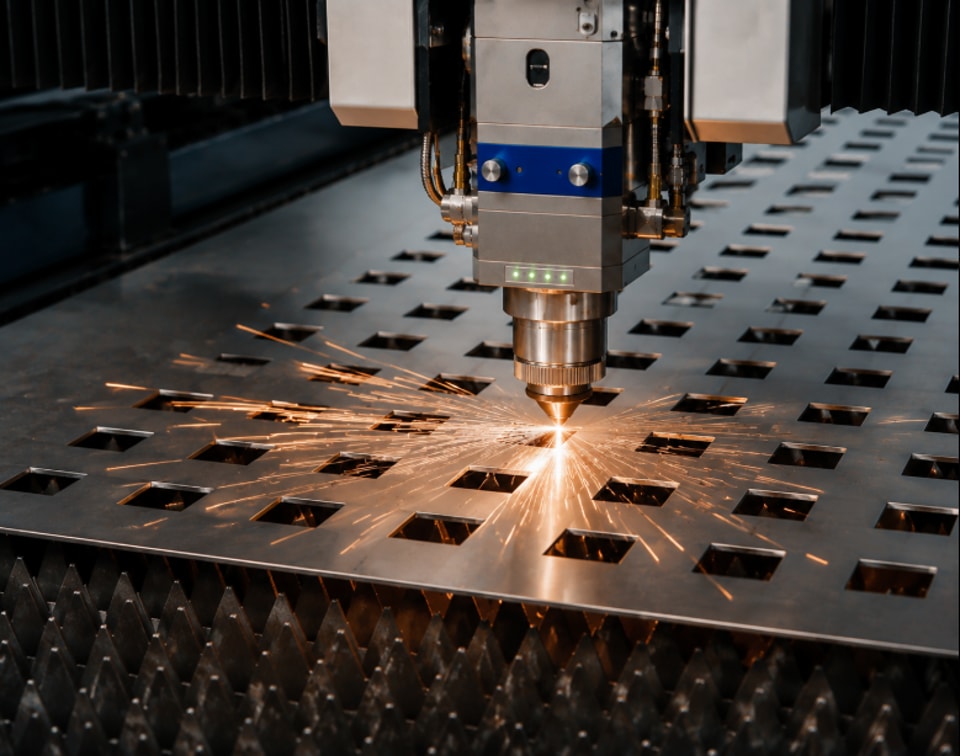
Laser cutting continuously produces smoke, fine metal particles, and airborne dust. If these contaminants are not removed effectively, they can settle on protective lenses, mirrors, nozzles, and other areas associated with the optical path.
Improper Lens Cleaning Methods
Optical surfaces require careful handling. Rough cloths, unsuitable cleaning liquids, or incorrect wiping methods may leave residue or create scratches, increasing the risk of optical degradation.
Poor Workshop Environment
A workshop with high levels of airborne dust and inadequate ventilation exposes the laser system to more contamination. Particles in the surrounding air can enter sensitive areas during operation or maintenance.
Cooling System Problems
Cooling-system abnormalities or poor water quality may contribute to condensation or impurities around sensitive components. Stable cooling conditions and suitable water quality are therefore important for maintaining optical-system reliability.
How Optical Path Contamination Affects Laser Cutting Performance
Reduced Laser Power Transmission
Contamination on lenses or mirrors can absorb or scatter part of the laser energy. Less usable power then reaches the cutting area, reducing processing efficiency.
Poor Cutting Quality
As contamination becomes more serious, operators may observe rough edges, burrs, incomplete penetration, or inconsistent cutting gaps. These symptoms can indicate that the optical system is no longer transmitting the beam efficiently.
Overheating of Optical Components
Contaminated optical surfaces can absorb additional heat. This thermal load may damage coatings, crack protective lenses, or affect mirrors and other sensitive components.
Increased Maintenance Costs
Repeated optical damage increases the frequency of component replacement and maintenance intervention. It can also create additional machine downtime and raise overall operating costs.
Step-by-Step Guide to Prevent Optical Path Contamination in a Laser Cutter
Step 1: Keep the Working Environment Clean
Maintain a clean workshop around the laser cutting machine and reduce unnecessary airborne dust. Good ventilation and regular housekeeping help prevent particles from entering sensitive areas of the equipment.
Remove accumulated debris from the surrounding production area and avoid opening optical components in a dusty environment whenever possible.
Step 2: Inspect the Optical Components Regularly
Check protective lenses, mirrors, and nozzles routinely for dust, residue, discoloration, or other signs of contamination.
In high-production environments, daily inspection is particularly important. Detecting contamination early allows it to be removed before excessive heat or optical damage develops.
Step 3: Use Proper Cleaning Materials
Use lint-free wipes and cleaning solutions specifically approved for optical components. Avoid touching optical surfaces directly with bare fingers because fingerprints and oils can contaminate the lens.
Cleaning should be performed gently and according to the recommended procedure. Improper materials or excessive force may scratch the surface or leave unwanted residue.
Step 4: Maintain the Dust Extraction System
An effective smoke and dust extraction system removes contaminants before they can circulate around the machine and settle on optical components.
Inspect and clean extraction filters regularly and make sure airflow remains unobstructed. Stable extraction performance helps control both visible smoke and fine airborne particles generated during cutting.
Step 5: Monitor the Cooling System
Check that the water chiller and cooling circuit operate normally. Where specified by the equipment manufacturer, use purified water to reduce impurities that could affect system stability.
Cooling performance and water condition should be included in routine maintenance because abnormal cooling conditions may indirectly contribute to optical-system problems.
Step 6: Replace Damaged Protective Lenses Promptly
Protective lenses should not remain in service after serious damage is identified. Burn marks, scratches, discoloration, or other visible defects are signs that replacement may be necessary.
Replacing a damaged protective lens promptly helps prevent further contamination and protects more expensive optical components deeper inside the laser system.
Preventive Maintenance Tips for Laser Optical Systems
Schedule Routine Cleaning
Create a cleaning and inspection schedule based on machine utilization. Equipment operating in high-volume production generally requires more frequent optical maintenance than machines used intermittently.
Train Operators Properly
Operators should know how to handle optical components safely, use approved cleaning procedures, and recognize early symptoms of contamination or optical damage.
Avoid Excessive Cutting Smoke
Use appropriate cutting parameters to avoid generating unnecessary smoke during processing. Reducing excessive smoke lowers the contamination load placed on the extraction system and optical components.
Store Spare Optical Components Correctly
Keep spare lenses, mirrors, and related optical parts sealed in clean, dust-free packaging until installation. Correct storage prevents components from becoming contaminated before they are used.
FAQs
What are the signs of optical path contamination in a laser cutter?
Typical warning signs include reduced cutting power, rough or inconsistent cutting edges, overheating around optical components, unstable cutting performance, and repeated protective-lens damage.
How often should laser cutter optical components be cleaned?
Cleaning frequency depends on production intensity and the operating environment. In high-production conditions, optical components should be inspected daily and cleaned whenever contamination is detected.
Can dirty lenses damage the laser cutting machine?
Yes. Contaminated lenses can absorb additional laser energy and heat, potentially leading to lens cracking, mirror damage, unstable laser output, and increased maintenance requirements.
Conclusion
Preventing optical path contamination is essential for maintaining stable laser transmission, consistent cutting quality, and long-term machine reliability.
Keeping the workshop clean, inspecting optical components regularly, using appropriate cleaning materials, maintaining the extraction and cooling systems, and replacing damaged protective lenses promptly can substantially reduce contamination risks.
A structured preventive maintenance program also helps extend the service life of costly optical components, reduce unexpected downtime, and control operating expenses.
For additional guidance on laser cutting machine maintenance, optical-system care, troubleshooting, or equipment selection, the JUGAO team can provide professional technical support and practical solutions for your production requirements.
Contact Us