
Laser Safety Devices Maintenance Guide
2026-09-05

SEO Configuration
SEO Title: JUGAO Laser Safety Devices Maintenance Guide: Inspection, Testing and Preventive Care
Meta Description: Learn how to inspect, clean, test and calibrate laser safety devices to protect operators, reduce false alarms and improve machine reliability.
Focus Keyword: laser safety devices maintenance
Secondary Keywords: laser safety interlock inspection, light curtain maintenance, emergency stop testing, laser machine safety system
Suggested URL Slug: /laser-safety-devices-maintenance-guide/
English Version
How to Maintain Laser Safety Devices Properly
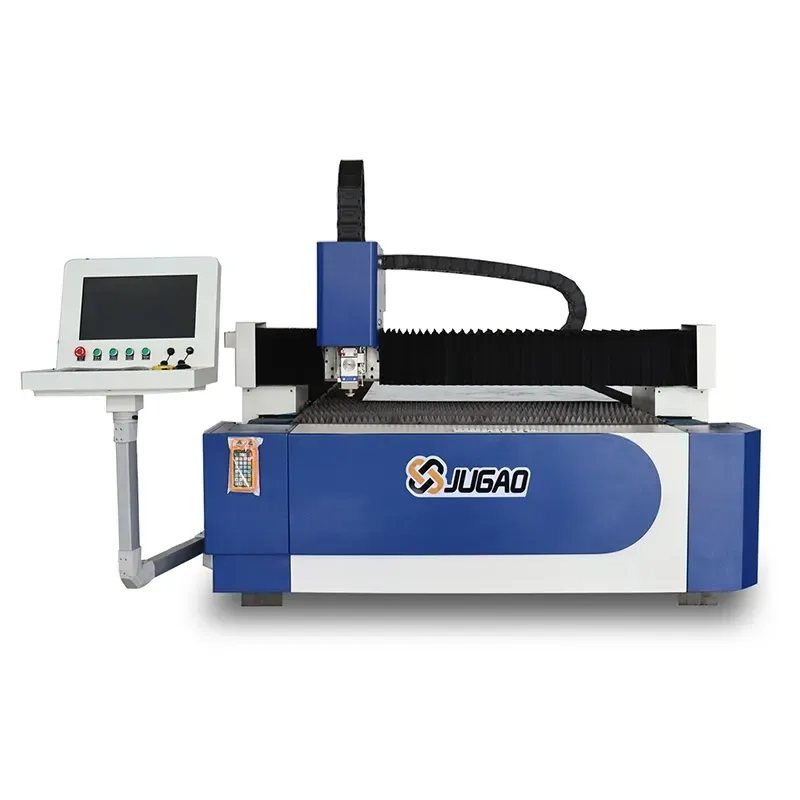
A laser cutting machine relies on more than cutting power and motion accuracy. Its safety devices form a protective control network that must respond correctly whenever an unsafe condition occurs. Door interlocks, light curtains, emergency-stop circuits, alarms and monitoring sensors are designed to protect operators and prevent hazardous machine movement. When any of these components becomes dirty, loose, misaligned or electrically unstable, the machine may either fail to stop when required or shut down repeatedly without a real hazard.
This guide explains a practical maintenance sequence for JUGAO laser safety devices. The procedure keeps the original tutorial order while presenting the information in a new structure and wording. Following these steps can improve operator protection, reduce nuisance alarms, support compliance requirements and help the machine remain available for production.
Table of Contents
1. Why Laser Safety Device Maintenance Matters
2. Step-by-Step Maintenance Procedure
Step 1: Inspect Safety Interlock Systems
Step 2: Clean Light Curtains and Laser Sensors
Step 3: Test Emergency Stop Buttons
Step 4: Check Safety Wiring and Electrical Connections
Step 5: Verify Alarm and Warning Systems
Step 6: Calibrate Safety Monitoring Systems
3. Common Problems in Laser Safety Devices
4. Best Practices for Long-Term Reliability
5. Frequently Asked Questions
6. Conclusion
Why Laser Safety Device Maintenance Matters

Protecting Operators from Laser Hazards
Industrial laser equipment operates with concentrated energy that can injure personnel if protective systems do not react as intended. A maintained safety circuit ensures that access doors, protective enclosures, light curtains and emergency-stop devices interrupt hazardous operation at the correct moment. Periodic functional checks are therefore a direct part of operator protection, not merely a routine service task.
Preventing Unplanned Machine Stops
Safety devices can also interrupt production when they generate false signals. Dust on an optical sensor, a loose terminal or a worn door switch may repeatedly stop the machine even though the work area is safe. Preventive inspection allows maintenance teams to correct these small problems before they develop into recurring alarms or extended downtime.
Supporting Safety Compliance
Laser equipment must be operated in accordance with applicable workplace rules, risk-control procedures and machine documentation. Keeping inspection records and verifying that protective functions work correctly helps demonstrate that the machine is being maintained as a controlled industrial system.
Step-by-Step Laser Safety Devices Maintenance Guide
Step 1: Inspect Safety Interlock Systems
Begin with all enclosure doors, access panels and guarding switches. Confirm that each interlock is firmly mounted and that its actuator aligns correctly with the switch body. With the machine in an approved test condition, verify that opening a protected door immediately disables laser emission or hazardous motion as specified by the machine design.
Inspect the switch housing, mounting screws, cables and connectors for impact damage, looseness or wear. A switch that only works intermittently should not be adjusted repeatedly and returned to service without identifying the cause. Replace damaged components and confirm the interlock function again after the repair.
Step 2: Clean Light Curtains and Laser Sensors
Optical safety devices need a clear sensing path. Smoke residue, metal dust, oil mist and fingerprints can weaken the signal between a transmitter and receiver or cover the surface of a detection sensor. Isolate the equipment according to the maintenance procedure, then clean the optical surfaces with a soft lint-free cloth and a cleaner approved for the sensor material.
Do not use abrasive fabric, sharp tools or excessive liquid. After cleaning, check that the light curtain is aligned and that its status indicators show normal operation. Test the detection field at several positions rather than checking only one point.
Step 3: Test Emergency Stop Buttons
Every emergency-stop device must operate quickly, latch mechanically and require a deliberate reset. Test each button individually during scheduled inspections. When the button is pressed, confirm that the machine enters the intended safe state and that laser operation cannot restart automatically.
After resetting the button, verify that the machine follows the correct restart sequence. Check for cracked button heads, loose mounting rings, damaged labels or slow mechanical return. Any emergency-stop device with uncertain operation should be removed from service until it is repaired or replaced.
Step 4: Check Safety Wiring and Electrical Connections
Inspect the cables, terminal blocks, connectors and control modules associated with the safety circuit. Look for loose conductors, corrosion, insulation damage, heat discoloration and cable strain near moving sections. Unstable wiring can create intermittent faults, false alarms or a complete loss of communication between the safety device and the CNC or safety controller.
Tighten connections only to the specified torque and replace damaged wiring rather than covering serious defects with temporary repairs. Electrical testing should be carried out by qualified personnel using the machine schematic and the correct diagnostic instruments.
Step 5: Verify Alarm and Warning Systems
Audible alarms, beacon lights, warning messages and fault indicators must be easy for operators to recognize. Trigger each relevant test condition and confirm that the correct warning appears at the correct location. Check that lamps are visible, sounders are audible over normal workshop noise and messages on the control screen match the actual fault.
Incorrect or unclear warnings can delay the operator's response. Replace failed indicators, repair communication faults and update damaged labels before the machine returns to normal production.
Step 6: Calibrate Safety Monitoring Systems
Modern laser machines may use integrated safety monitoring for enclosure status, beam detection, access control and protective-zone supervision. These systems must be checked and calibrated according to the equipment manual and the sensor manufacturer's requirements.
During calibration, verify sensor alignment, switching distance, response status and communication with the safety controller. Record the test result and any correction value. If a device cannot maintain calibration, investigate mounting stability, contamination, electrical noise and component condition before replacing it.
Common Problems in Laser Safety Devices
Sensor Contamination
Cutting smoke and airborne particles can accumulate on optical devices and reduce signal strength. The result may be delayed detection, repeated faults or an unnecessary machine stop. Regular cleaning and effective fume extraction reduce this risk.
Interlock Failure
Door switches experience repeated mechanical cycles. Misalignment, impact, loose fasteners and worn actuators can cause inconsistent operation. Interlocks should be inspected as a complete assembly, including the mounting structure and cable, rather than checking only the switch body.
Electrical Signal Instability
Loose terminals, damaged cables, poor grounding or electromagnetic interference may interrupt the signal between a safety device and the control system. Because these faults can appear only during vibration or machine movement, maintenance records and systematic cable inspection are important for diagnosis.
Best Practices for Long-Term Laser Safety Device Reliability
Establish a Fixed Inspection Schedule
Create daily, weekly and monthly checks based on machine usage and the manufacturer's service requirements. Daily checks can cover visible damage and status indicators, while scheduled functional tests should verify interlocks, emergency stops, alarms and sensor response.
Train Operators to Recognize Abnormal Conditions
Operators should understand what each safety device does, what a normal status looks like and which faults require the machine to be stopped. Clear training reduces the chance that a warning is ignored or that a protective device is bypassed to keep production running.
Keep the Machine and Workshop Clean
Good housekeeping reduces contamination on sensors, wiring and safety modules. Maintain effective ventilation and fume extraction, remove cutting debris regularly and prevent oil or coolant from reaching optical safety components.
Document Every Inspection and Repair
Record the inspection date, device tested, result, corrective action and responsible technician. A complete maintenance history helps identify repeated faults, supports preventive replacement decisions and provides evidence that safety functions are being managed systematically.
Frequently Asked Questions
How often should laser safety devices be inspected?
Operators should perform a brief visual and status check before or during each shift. More detailed functional testing should be completed weekly, monthly or at the interval specified in the JUGAO machine documentation and the site's safety plan.
What happens when laser safety sensors become dirty?
Contamination can weaken or interrupt the optical signal. The machine may produce false alarms, stop unexpectedly or fail to identify a protected-zone interruption reliably. Clean the device with approved materials and confirm alignment and function afterward.
Can a damaged safety interlock affect machine operation?
Yes. A defective interlock may prevent startup, cause intermittent shutdowns or fail to stop hazardous operation when a guard is opened. The machine should not be returned to normal use until the interlock has passed a complete functional test.
Can operators bypass a safety device to finish a production job?
No. Bypassing a protective device creates a serious hazard and may violate site procedures and applicable safety requirements. The cause of the fault should be repaired by qualified personnel.
Who should perform electrical and calibration work?
Electrical testing, safety-circuit diagnosis and calibration should be handled by trained and authorized technicians who understand the machine schematic, lockout procedures and required test equipment.
Conclusion
Reliable laser operation depends on safety devices that respond correctly every time. By inspecting interlocks, cleaning optical sensors, testing emergency stops, checking safety wiring, verifying alarms and calibrating monitoring systems in the required sequence, maintenance teams can reduce risk and prevent avoidable production interruptions.
JUGAO recommends treating safety-device maintenance as a documented preventive program rather than an occasional repair activity. For model-specific inspection procedures, calibration requirements or replacement parts, contact the JUGAO technical service team and refer to the operating documentation supplied with the machine.
Contact Us