
How to Maintain a Laser Power Supply Effectively
2026-09-07

SEO Configuration
SEO Title | Laser Power Supply Maintenance Guide | JUGAO |
Meta Description | Learn how to maintain a laser power supply safely, prevent overheating and voltage instability, and extend the service life of JUGAO laser equipment. |
Focus Keyword | laser power supply maintenance |
Secondary Keywords | laser machine power supply, laser cutter maintenance, power supply troubleshooting, laser equipment preventive maintenance |
Suggested URL Slug | /laser-power-supply-maintenance-guide/ |
Search Intent | Informational / technical maintenance guide |
Table of Contents
· 1. Why Laser Power Supply Maintenance Matters
· 2. Understanding the Laser Power Supply
· 3. Common Causes of Power Supply Problems
· 4. Step-by-Step Laser Power Supply Maintenance
· Step 1: Shut Down the Machine and Apply Safety Controls
· Step 2: Inspect Cables, Connectors, and Terminals
· Step 3: Remove Dust and Contamination
· Step 4: Check Temperature and Cooling Performance
· Step 5: Measure Voltage and Current Output
· Step 6: Replace Worn or Aging Components
· Step 7: Build a Regular Maintenance Schedule
· 5. Best Practices for Long-Term Power Supply Health
· 6. Frequently Asked Questions
· 7. Conclusion and JUGAO Support
English Version
Why Laser Power Supply Maintenance Matters
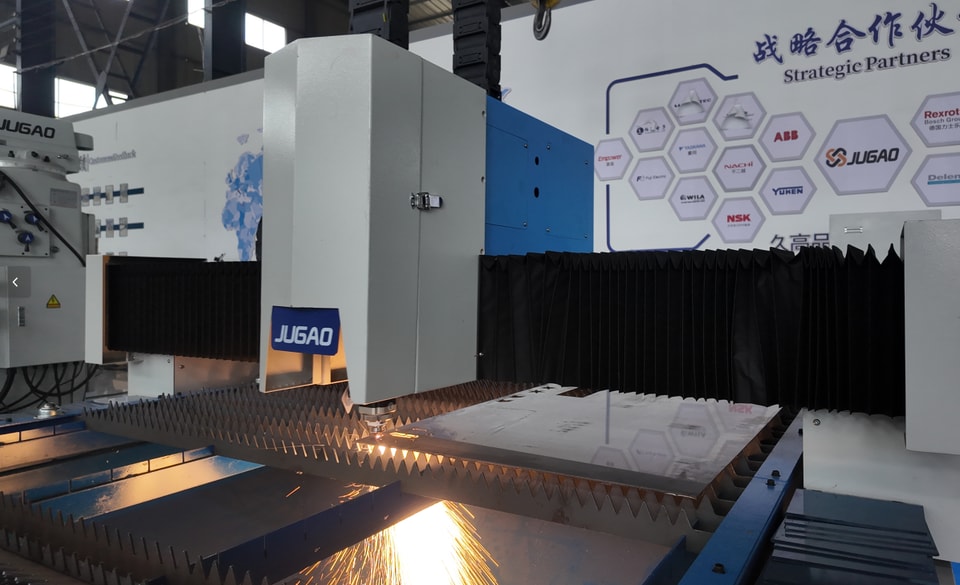
A laser machine depends on more than the laser source, cutting head, or control software. The power supply is the component that converts incoming electrical energy into the stable voltage and current required by the laser system. When that output becomes unstable, the entire process can suffer: cutting power may fluctuate, engraving depth may vary, electronic components may overheat, and the machine may stop without warning.
Preventive maintenance helps operators identify minor electrical, thermal, and contamination-related problems before they develop into expensive failures. A well-maintained power supply supports consistent energy delivery, protects sensitive components, reduces unplanned downtime, and contributes to longer equipment life. For JUGAO laser equipment, routine checks should always be performed according to the machine manual and by qualified personnel whenever electrical testing or internal component replacement is required.
Understanding the Laser Power Supply
Core Function of the Power Supply
The laser power supply regulates and delivers the electrical energy needed by the laser source. Depending on the machine configuration, it supplies the required voltage and current to the laser tube, laser generator, or related control circuits. Stable output allows the laser to produce predictable power, which directly affects cutting speed, edge quality, engraving consistency, and process repeatability.
Common Causes of Power Supply Problems
Most power supply faults do not appear suddenly. They often develop from recurring workshop conditions such as dust accumulation, poor ventilation, loose terminals, voltage spikes, high ambient temperature, aging capacitors, damaged wiring, or overloaded operation. These conditions can increase electrical resistance, reduce cooling efficiency, and place additional stress on internal components. Early inspection is therefore more effective and less costly than waiting for a complete shutdown.
Step-by-Step Laser Power Supply Maintenance
Step 1: Shut Down the Machine and Apply Safety Controls
Before opening an electrical cabinet or approaching the power supply, stop the laser machine through the normal shutdown procedure. Isolate the equipment from the main electrical source and follow the site lockout/tagout procedure where applicable. Do not assume the unit is safe immediately after disconnection, because capacitors may retain dangerous electrical charge. Allow the discharge time specified by the manufacturer and verify the absence of voltage with an appropriate tester. Wear suitable personal protective equipment and ensure that only authorized technicians perform internal electrical work.
Step 2: Inspect Cables, Connectors, and Terminals
Examine incoming power cables, output leads, grounding conductors, plugs, terminal blocks, and control connectors. Look for loose screws, discoloration, heat marks, cracked insulation, oxidation, corrosion, or damaged cable glands. Loose electrical connections can generate heat and cause intermittent voltage drops, while damaged insulation may create a serious safety risk. Tighten terminals only to the specified torque and replace compromised wires or connectors instead of applying temporary repairs. Confirm that protective grounding remains secure before returning the machine to service.
Step 3: Remove Dust and Contamination
Dust, metal particles, and oily residue can collect around ventilation openings, cooling fans, heat sinks, and circuit boards. This contamination restricts airflow and may create conductive paths between electrical components. Clean the exterior and accessible ventilation areas with a dry anti-static cloth, a suitable electronics vacuum, or low-pressure dry air as permitted by the equipment manual. Avoid directing high-pressure air into sensitive assemblies because it can force debris deeper into the unit or damage components. Never use wet cleaning materials on energized electrical equipment.
Step 4: Check Temperature and Cooling Performance
Heat is one of the most common causes of shortened power supply life. Confirm that all cooling fans rotate smoothly, air filters are clean, heat sinks are unobstructed, and cabinet ventilation is not blocked by stored materials. Listen for fan noise that may indicate worn bearings and check whether airflow is weaker than normal. Review the operating temperature shown by the machine controller when available, and compare it with JUGAO specifications. Repeated thermal alarms may indicate inadequate ventilation, excessive load, a failed fan, blocked filters, or an internal electrical fault.
Step 5: Measure Voltage and Current Output
After visual inspection and cleaning, qualified technicians should verify the electrical output using a calibrated multimeter or manufacturer-approved diagnostic instrument. Measure only at the designated test points and follow the test procedure in the machine documentation. Compare the results with the rated values under the specified operating conditions. Unstable readings, excessive ripple, output below the expected range, or abnormal current draw can signal a failing component, poor connection, input power problem, or overload. Do not adjust internal settings without authorization, because incorrect calibration can damage the laser source and control electronics.
Step 6: Replace Worn or Aging Components
Components such as fuses, relays, cooling fans, capacitors, connectors, and filters gradually deteriorate with heat and operating time. Signs that require attention include swelling, leakage, burning odor, darkened surfaces, repeated fuse operation, unstable fan speed, or visible corrosion. Replace defective parts with components that match the original electrical rating and technical specification. Capacitor replacement and circuit-board repair should be performed by trained service personnel because stored energy and incorrect polarity present significant hazards.
Step 7: Build a Regular Maintenance Schedule
A maintenance program should combine daily observation with scheduled technical inspection. Operators can check for alarms, abnormal odor, unusual fan noise, unstable cutting power, and excessive cabinet temperature during routine production. Cleaning frequency should reflect the amount of dust and metal contamination in the workshop. Electrical testing, terminal tightening, and internal inspection should follow the JUGAO maintenance manual and the actual machine workload. Record every inspection so that gradual changes can be identified before they affect production.
Best Practices for Long-Term Power Supply Health
Maintain a Clean and Stable Operating Environment
Keep the machine area dry, ventilated, and as free as possible from metal dust, oil mist, and extreme temperature changes. Do not block cabinet air inlets or outlets. Environmental control reduces thermal stress and prevents contamination from reaching sensitive electronics.
Protect the Machine from Power Surges
Use correctly specified surge protection, voltage stabilization, or an uninterruptible power supply when recommended for the installation. Verify that the facility supply, grounding, and phase conditions meet the machine requirements. Protection devices should also be inspected periodically rather than assumed to remain effective indefinitely.
Avoid Unnecessary Electrical Load
Operate the laser system within its rated capacity. Repeated operation under abnormal load, frequent emergency switching, or unstable facility power can place additional stress on the power supply. Investigate repeated alarms instead of resetting the machine and continuing production without identifying the cause.
Document Every Maintenance Action
Create a maintenance log that records the date, operating hours, test readings, cleaning work, replaced parts, alarms, and technician observations. Historical data makes it easier to recognize gradual voltage changes, increasing operating temperature, or repeated component failures.
Use Approved Parts and Procedures
Replacement components, protective devices, and electrical settings should match the JUGAO technical documentation. Unverified parts may have different voltage, current, temperature, or response characteristics and can reduce reliability or create safety risks.
Frequently Asked Questions
How often should a laser power supply be maintained?
Operators should perform routine visual checks during normal use. Cleaning, electrical inspection, and output testing should be scheduled according to the machine manual, workload, and workshop conditions. Machines operating in dusty or high-temperature environments may require more frequent attention.
Can poor power supply maintenance damage the laser source?
Yes. Unstable voltage, overheating, and repeated electrical interruptions can place stress on the laser tube, laser generator, and control components. Correct maintenance helps provide the stable electrical conditions required for reliable operation.
Which tools are commonly used for maintenance?
Typical tools include insulated hand tools, a calibrated multimeter, a voltage tester, anti-static cleaning materials, an electronics vacuum, and manufacturer-approved diagnostic equipment. The exact tools depend on the machine and the work being performed.
What are the warning signs of a failing power supply?
Common warning signs include unstable laser output, random machine shutdowns, repeated electrical alarms, excessive heat, unusual fan noise, burning odor, discolored terminals, and voltage readings outside the specified range.
Can compressed air be used to clean the power supply?
Only when the machine documentation permits it. Use clean, dry, low-pressure air and avoid forcing debris into circuit boards or connectors. An anti-static vacuum is often safer for removing loose contamination from electrical cabinets.
Should operators open the power supply enclosure?
Internal servicing should be limited to authorized and qualified electrical technicians. High-voltage components and capacitors can remain hazardous after the machine has been disconnected from power.
Conclusion
Effective laser power supply maintenance is essential for stable energy delivery, consistent cutting performance, and reliable machine operation. By following the correct sequence—safe shutdown, connection inspection, contamination removal, cooling checks, output testing, component replacement, and scheduled documentation—operators can reduce the risk of sudden failure and protect critical laser-system components.
For maintenance intervals, test limits, and replacement specifications, always refer to the manual supplied with the equipment. JUGAO can provide technical guidance, spare parts support, and after-sales assistance for customers who need help evaluating power supply performance or planning preventive maintenance.
Contact Us