
How does the CYBELEC CybTouch 6 C tool management system optimize production?
2026-02-03

If you're looking to improve metalworking efficiency, the CYBELEC CybTouch 6 C Tool Management System may be the solution for you. This article provides an in-depth look at this innovative management tool, explaining how it optimizes tool management on bending machines and streamlines operations, helping you achieve higher productivity and production organization. Whether your goal is to improve tool management order or maximize throughput, understanding the CybTouch 6 C Tool Management System will greatly benefit your production goals. We will now analyze the system's core advantages and functions in detail, providing you with the key information needed to effectively utilize this tool.
System Overview
The CYBELEC CybTouch 6 C Tool Management System is a core feature that allows users to create and configure various tools directly within the CybTouch interface. This advanced tool management system integrates tool data into bending calculations, ensuring accuracy and efficiency in every metalworking operation.
Note that the availability of upper and lower die management functions in the CybTouch 6 C Tool Management System may vary depending on the specific circumstances. This depends on the CybTouch software version you are using and the specific configuration of your bending machine. Therefore, it is recommended to confirm the compatibility of these functions with your device before use to fully realize the potential of the CybTouch 6 C tool management system in optimizing production processes.
Punches
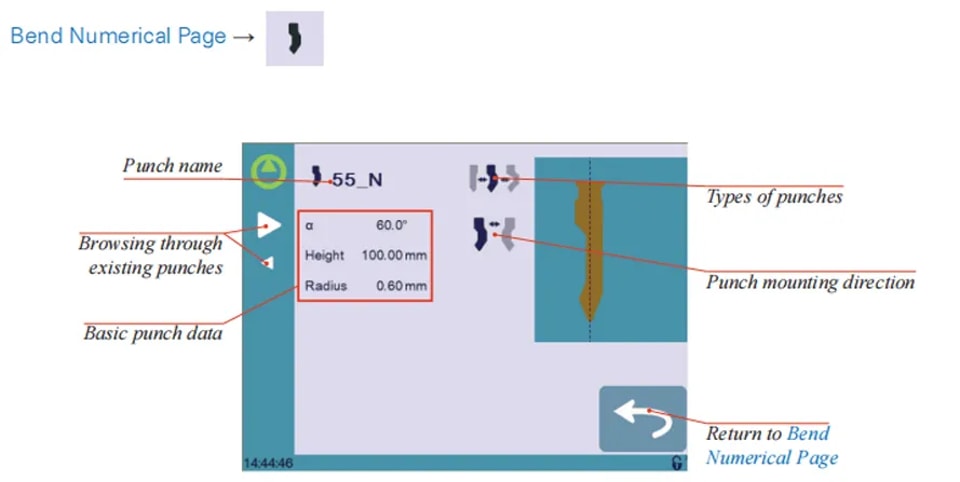
Setting Instructions:
To select a punch, simply browse through the existing punches in your library using the arrows buttons, and then return to Bend Numerical Page.
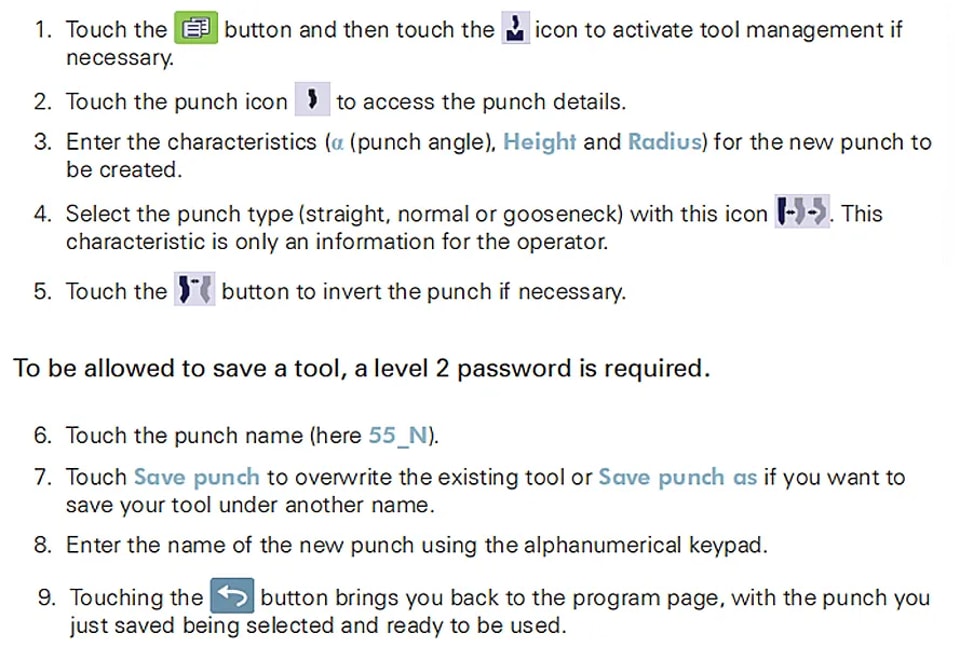
How to create or modify a punch?
The CYBELEC CybTouch 6 C Tools Management system offers an intuitive approach to organizing and handling these essential tools.
For instance, if no punch has been created within the system, it appears unnamed with ‘???’ as the placeholder. However, if a punch already exists, the CYBELEC CybTouch 6 C Tools Management system automatically selects the last punch used, designated as, for example, 55_N. This selection process ensures that any modifications made will not alter the existing punch, as changes are saved under a new name.
Dies
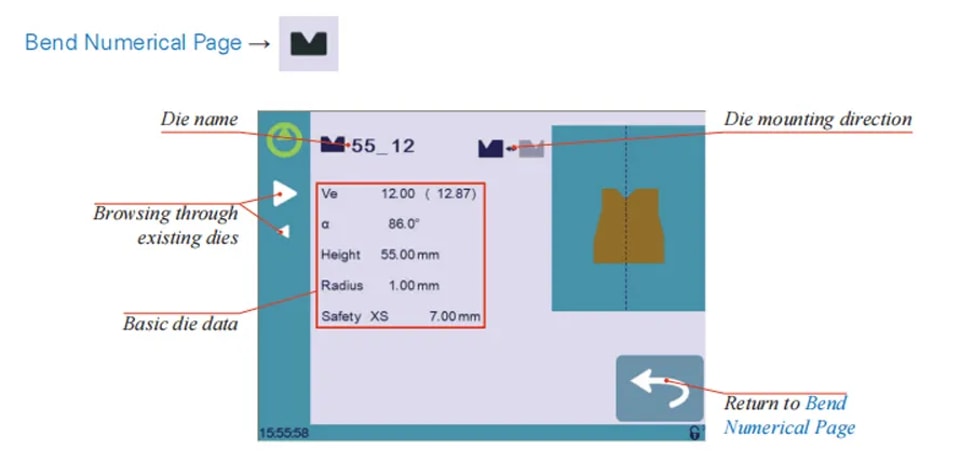
Setting Instructions:
Selecting a die is the same as selecting a punch; simply browse through the existing dies in your library using the arrows buttons, and then return to Bend Numerical Page.
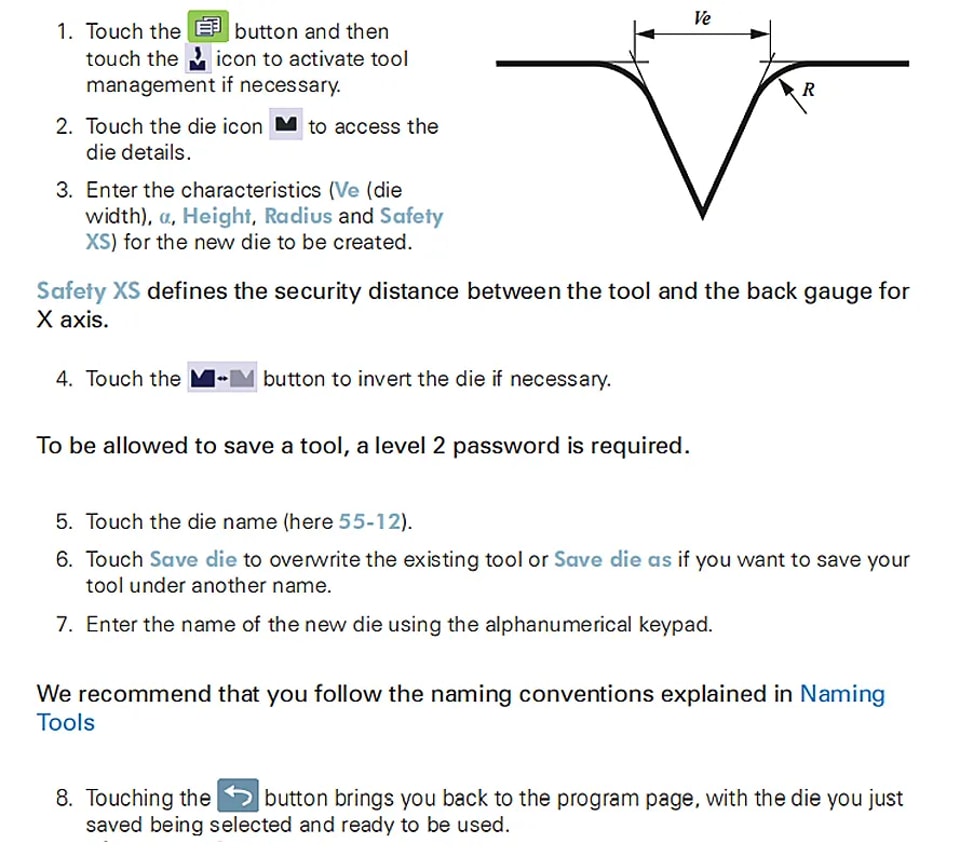
How to create or modify a die?
If no die is yet created on the CYBELEC CybTouch 6 C Basic Page, the die will remain unnamed, and “???” will be displayed. However, if a die already exists, the last one used, such as 55_12, will be automatically selected on the CYBELEC CybTouch 6 C Basic Page. Any modifications made will not alter the existing die, as they will be saved under a different name.
Naming Tools
In the context of utilizing the features of the CYBELEC CybTouch 6 C Basic Page, it is recommended that you use naming conventions for your tools to streamline operations and ensure clarity. Below you will find a straightforward naming convention that allows you to precisely identify a punch or die through its name within the CYBELEC CybTouch 6 C Basic Page interface.
Of course, depending on your needs you may need to create more rules for punch and die naming.
Punches
The name of the punch should be built in the following manner: first its angle, followed by its type, and then whether it is inverted or not.

Following these rules, here are some examples of punch names: 90_N_i, 60_G, 30_S, and so on, and so forth.
Dies
The name of the die should be built in pretty much the same manner: first its width (Ve dimension), followed by its angle, and then whether it is inverted or not.

Following these rules, here are some examples of die names: 12_86_i, 16_86, 20_30, and so on, and so forth.
Conclusion
In summary, the CYBELEC CybTouch 6 C tool management system provides you with an efficient and user-friendly tool management interface. Its core functions, such as automatic tool selection and independent saving of modifications, effectively simplify workflows, improve productivity, and maintain operational accuracy. These features ensure smooth production operations without interfering with existing tool settings.
A thorough understanding and effective use of the CYBELEC CybTouch 6 C tool management system is crucial for improving the efficiency and performance of metalworking processes. For further assistance, access to more technical documentation, or to speak directly with experts, please feel free to contact our team at JUGAO CNC MACHINE. You can also visit our website for more resources and guidelines to help optimize equipment operation.
Contact Us